

Table of Contents
Why AI Is the New Backbone of E-Commerce Imagery
Modern e-commerce runs on visuals. Your product photos decide:
- Whether customers stop scrolling
- Whether they trust your brand
- Whether they finally click “Buy Now”
But traditional product photography is expensive, slow, and often inconsistent. You need a studio, lighting setup, editing time, and multiple retakes — especially if you sell multiple variants, SKUs, or color options.
AI has changed this completely.
Using generative AI, you can now produce studio-level images, lifestyle shots, multiple backgrounds, model variations, and color changes — all within minutes and at a fraction of the cost.
AI helps you:
- Create premium product photos instantly
- Maintain a consistent brand style
- Test multiple image variations for ads
- Scale image production without photo shoots
- Save time, money, and manual editing
AI doesn’t just make product images better — it makes them faster, cheaper, and more flexible than ever before.
Use Cases: Practical Ways AI Upgrades Your E-Commerce Product Images
Below are the most powerful AI image use cases for any online store:
1. Model Face Change
Brands can replace the model’s face with:
- A different demographic
- A customer persona
- A more diverse model
- A consistent brand model across all products
Useful for fashion, apparel, and beauty stores that need variations based on region, target audience, or ads.
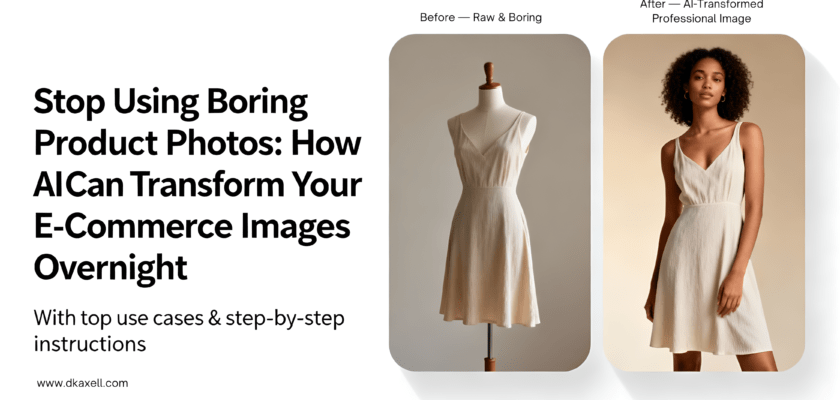
2. Mannequin to Model Conversion
If you have mannequin images but want real human models:
AI can turn a mannequin-worn outfit into a real model photo.
This immediately increases trust and presentation quality — without hiring a model.
3. Product Hand-Held Photography
Show your product in a hand:
- Human hands for lifestyle brands
- Men’s or women’s hands based on your audience
- Child hands for toys
- Elderly hands for medicine-related products
This helps shoppers judge the size, scale, and usability of your product.
4. Product Color Change
Instead of re-shooting every color variation:
AI can instantly create:
- Blue
- White
- Black
- Pastel
- Metallic
- Glossy / matte versions
Perfect for apparel, accessories, bottles, electronics, footwear, etc.
5. Model Pose Change
You can keep the same model but:
- Change pose
- Tilt the angle
- Turn left or right
- Adjust body posture
- Create walking or standing poses
Great for catalogs, ads, and PDP (product detail page) galleries.
6. Background Replacement & Scene Creation
AI can generate unlimited backgrounds:
- Nature
- Beach resort
- Studio
- Minimal white
- Luxury marble
- Retail store shelves
- Kitchen or bedroom lifestyle scenes
This is perfect for A/B testing different styles.
7. Full Studio-Level Photoshoot Replacement
AI can generate:
- Soft shadows
- Perfect lighting
- Clean reflections
- Ultra-sharp resolutions
- 3D-style renders
- High-end editorial looks
This replaces the need for a physical studio, saving thousands per month.
How to Use AI to Generate E-Commerce Images Step-by-Step
Here’s the exact workflow you can use with any AI model like ChatGPT, Gemini, Perplexity, or Midjourney.
Step 1: Ask AI to Generate the Right Prompt
Example message to ChatGPT or Gemini:
“Create a high-quality prompt for generating studio-level e-commerce product photos for a matte black water bottle with soft shadows and premium lighting.”
You will get a detailed prompt like:
Sample Prompt
Create a premium studio-quality product image of a matte black stainless steel water bottle on a clean white background. Soft diffused lighting, gentle shadows, 4K clarity, sharp details, realistic reflections, product centered with slight angle variations.Step 2: Add Negative Prompts (VERY IMPORTANT)
Negative prompts remove defects like:
- Extra fingers
- Warped shapes
- Incorrect reflections
- Unwanted backgrounds
- Unnatural lighting
Sample Negative Prompt
no distortions, no extra limbs, no text, no blur, no watermark, no unrealistic reflections, no incorrect proportions, no background clutterStep 3: Use Any AI Image Generator to Create Your Final Photos
Copy the full prompt + negative prompt into your selected AI image tool (Photoroom, Pebblely, Mixboard, etc.) and generate.
You can create:
- 20 images in minutes
- 10 background variations
- Multiple ad creatives
- Lifestyle scenes for social media
- Amazon/eBay/Shopify-ready images
Top AI Tools for E-Commerce Image Generation (With Links)
Here are the best tools for creating stunning product images:
1. Google Mixboard
Generate multiple consistent product images with pro-level styling.
🔗 https://labs.google/mixboard/
2. Google Whisk
Change subject, scene, and style separately for precise control.
🔗 https://labs.google/whisk/
3. Google Gemini
Best AI for generating prompts, creative direction, and refining ideas.
🔗 https://gemini.google.com/
4. Perplexity
Useful for researching ideas, prompts, and real examples of e-commerce visuals.
🔗 https://www.perplexity.ai/
5. Sora (OpenAI)
Generate cinematic video product ads for upcoming features.
🔗 https://openai.com/sora
6. Photoroom
Create instant product backgrounds, studio shots, and lifestyle scenes.
🔗 https://www.photoroom.com/
7. Pebblely
Perfect for product-specific image generation for D2C and beauty brands.
🔗 https://www.pebblely.com/
Conclusion
AI is not just a trend — it’s the future of e-commerce imagery.
It allows you to:
- Replace boring product photos
- Create stunning studio-quality visuals
- Build brand consistency
- Produce content fast
- Save massive photography costs
- Generate dozens of image variations instantly
If you’re running an online store, AI-generated images will give you a competitive edge and help you convert more customers.
Which AI image tool is your favorite — and which use case do you plan to use for your e-commerce store?